

Choosing the right website platform starts with understanding what you actually pay. Webflow pricing india 2026 is more layered than ever before, with two parallel billing systems, modular plans, usage-based overages, and a growing stack of add-ons. Whether you are a freelancer building your first portfolio, a startup launching a marketing site, or a growing agency managing dozens of client projects, this guide breaks down every cost, every tier, and every decision – clearly and completely.
What Is Webflow and Why Does Its Webflow Pricing Model Matter?
Webflow is a visual website builder and CMS platform that gives designers and developers the power to build production-ready websites without writing traditional code. In 2026, Webflow has rebranded itself as the Website Experience Platform (WXP), expanding beyond simple site building into A/B testing, native analytics, AI-driven personalization, and multi-language support.
This evolution makes Webflow incredibly powerful. It also makes Webflow pricing significantly more complex than it was just two years ago. The platform now operates on two separate billing tracks – one for hosting your live site and one for your design and collaboration workspace – and layers optional add-ons on top of both. Understanding this structure before you sign up saves you real money and a great deal of confusion.
Understanding Webflow’s Dual Billing System
Most people open Webflow’s pricing page, see multiple tables with different numbers, and immediately feel overwhelmed. The core reason for this confusion is simple: Webflow charges you for two completely separate things.
- Site Plans cover your live website – hosting, bandwidth, CMS storage, custom domain, and SEO features. You pay one Site Plan per published website.
- Workspace Plans cover your design environment – team collaboration, staging sites, code export permissions, and client management. You pay for your Workspace separately, on a per-seat basis.
A solo founder building one website needs one Site Plan and either the free Workspace Starter plan or a paid Workspace tier. An agency with ten clients needs ten Site Plans (one per live client site) and a higher Workspace plan to manage the collaboration. Mixing up these two systems is the single most common Webflow budgeting mistake in 2026.
Webflow Site Plans 2026: Full Breakdown
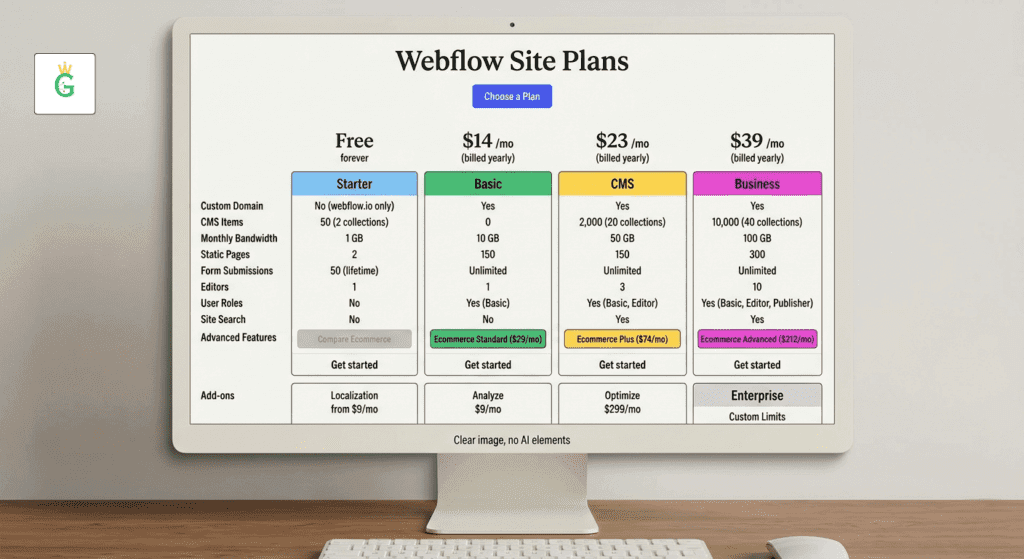
Site Plans are the foundation of every live Webflow website. They control what your site can do, how much traffic it can handle, and how much content you can manage. All prices below reflect annual billing. Monthly billing typically costs 25–33% more.
The Free Starter Plan
The Starter plan activates automatically when you sign up. It lets you build on a yoursite.webflow.io subdomain with up to 2 pages, 50 CMS items, and 1 GB of bandwidth. You cannot connect a custom domain on the free plan. This tier works well for learning the platform, prototyping ideas, and testing before you commit financially. It is a permanent freemium tier, not a time-limited trial.
General Site Plans (Non-eCommerce)
These plans serve blogs, portfolios, marketing sites, corporate websites, and any web property that does not require a built-in online store.
| Plan | Annual Price (per month) | Monthly Price | CMS Items | Bandwidth | Best For |
| Starter | Free | Free | 50 | 1 GB | Prototyping, learning |
| Basic | $14/mo | ~$18/mo | None | 50 GB | Static landing pages, brochures |
| CMS | $23/mo | $29/mo | 2,000 | 50 GB | Blogs, content marketing, SEO sites |
| Business | From $39/mo | ~$49/mo | 10,000–20,000 | 2.5 TB (base) | High-traffic sites, large content ops |
| Enterprise | Custom | Custom | Custom | Custom | Large orgs, advanced security, SLAs |
Basic Plan: Designed for simple static sites with no dynamic content needs. You gain access to Webflow’s powerful built-in SEO tools – 301 redirects, schema markup, sitemap controls, and meta tag management – from this tier upward. No CMS functionality is included, which means no blog collections or dynamic content.
CMS Plan: This is the most popular starting point for growing businesses. It unlocks Webflow’s full content management system with 2,000 CMS items, dynamic pages, site search, and editor access for content teammates. Most small and medium-sized businesses start here and never need to upgrade.
Business Plan: The Business plan in 2026 is modular, which makes it unique. The base tier at $39/month includes 10,000 CMS items and 2.5 TB of bandwidth. Higher tiers extend CMS capacity to 15,000 or 20,000 items at incrementally higher prices, reaching up to $1,049/month at the top. One important caveat: bandwidth actually decreases as CMS item limits increase, because you are paying for content capacity rather than traffic volume.
Enterprise Plan: Webflow tailors Enterprise pricing directly to each organization. It includes single sign-on (SSO), custom SLAs, advanced security compliance, dedicated support, and custom billing arrangements. You negotiate the price directly with Webflow’s sales team.
Webflow eCommerce Plans 2026: What Online Stores Pay
eCommerce Site Plans sit on top of General Site Plans and add store-specific functionality: product management, custom checkout design, payment gateway integration, shopping cart customization, and sales analytics. These plans replace the General Site Plan rather than adding onto it.
Want More Customers From Google?
Get a practical SEO strategy built around your business, industry and target audience — without generic packages or risky shortcuts.
eCommerce Plan Comparison Table
| Plan | Annual Price | Transaction Fee | Max Products | Annual Sales Volume | Staff Accounts |
| Standard | $29/mo | 2% per sale | 500 | No cap | 3 |
| Plus | $74/mo | 0% | 5,000 | No cap | 10 |
| Advanced | $212/mo | 0% | Unlimited | No cap | 15 |
Standard Plan: The Standard plan suits new and small online stores. It includes all features of the general CMS plan plus custom checkout, product management, and Stripe and PayPal integration. The critical cost to watch is the 2% Webflow transaction fee, which stacks on top of Stripe’s own standard processing fees. For a store generating $5,000 per month in sales, this fee adds $100 per month directly to your overhead before you even count payment processor charges.
Plus Plan: Removing the transaction fee is the primary reason businesses upgrade to Plus. At roughly $3,700 per month in gross sales, the 2% Standard fee equals the cost of the Plus plan itself. Any store crossing that sales volume saves money by upgrading. The Plus plan also increases product capacity to 5,000 items and expands to 10 staff accounts.
Advanced Plan: Built for established, high-volume operations. There is no product ceiling, no transaction fee, 15 staff accounts, and no restriction on annual sales volume. The $212/month price is significant but justifies itself quickly for stores processing serious sales numbers.
Website Builder India Price 2026: Best Affordable Plans Compared: Click Here
Webflow Workspace Plans 2026: Team and Agency Pricing
Workspace Plans govern how your team collaborates inside Webflow. They control the number of seats, staging site access, code export permissions, and client management capabilities. In 2026, Webflow offers two distinct Workspace tracks: In-House Workspace Plans for companies managing their own website, and Agency/Freelancer Workspace Plans for those building sites for clients.
In-House Workspace Plans
| Plan | Annual Price | Seats Included | Max Staging Sites |
| Starter | Free | 1 | 2 (webflow.io only) |
| Core | ~$19/mo | 3 | 10 |
| Growth | ~$49/mo | Unlimited | Unlimited |
| Enterprise | Custom | Custom | Custom |
Agency / Freelancer Workspace Plans
| Plan | Annual Price | Key Feature |
| Freelancer | Free (with paid Site Plan) | Client billing, up to 10 projects |
| Agency | $35/mo | Unlimited projects, advanced staging, client portals |
Seat Costs
Workspace plans include a base number of full seats, but every additional collaborator costs extra. Full seats run approximately $39/month each. Limited seats (for editors and content contributors) cost approximately $15/month each. A six-person marketing team can easily find their actual monthly cost far exceeding the base plan price once seat charges are factored in.
Webflow Add-Ons 2026: The New Cost Layer
In 2026, Webflow has aggressively expanded its add-on ecosystem as part of the WXP positioning. These modular features stack on top of your existing Site Plan and give Webflow capabilities that once required separate third-party subscriptions.
Webflow Add-Ons Pricing Table
| Add-On | Starting Price | What It Does |
| Localize (Essential) | $9/mo per locale | Machine translation, basic SEO localization, up to 3 locales |
| Localize (Advanced) | $29/mo per locale | Up to 10 locales, asset localization, regional content |
| Analyze | $9/mo | Privacy-friendly, cookieless native analytics |
| Optimize | $299/mo | A/B testing, multivariate testing, AI-driven personalization |
| Webflow AEO | Enterprise only | AI search engine visibility (coming soon) |
Localization: If you want your website available in multiple languages in 2026, Webflow no longer allows simple page duplication as a workaround. The Localization add-on handles multi-language management at the CMS level, making it the proper solution for global businesses. The Essential tier supports machine translation for up to 3 locales. The Advanced tier adds the ability to show region-specific images, videos, and assets to different audiences.
Analyze: This add-on delivers privacy-friendly analytics directly inside your Webflow dashboard. It avoids the complexity of integrating Google Analytics 4 and eliminates cookie consent complications. At $9/month it represents solid value for teams that want clean, actionable data without the technical overhead.
Optimize: The Optimize add-on starts at $299/month and scales in pricing tiers based on monthly page views (25K, 50K, 100K, 200K+). It brings A/B testing, multivariate testing, and AI-driven personalization directly into Webflow – functionality that would otherwise require enterprise tools like Optimizely or VWO. This add-on targets marketing teams running serious conversion optimization programs at scale.
Hidden Costs and Overage Fees in Webflow 2026
Webflow’s core pricing is transparent, but several usage-based charges can quietly increase your monthly bill if you are not monitoring usage closely.
Overage and Extra-Cost Summary
| Item | Overage Cost |
| Extra 5,000 CMS items | +$25/mo (annual billing) |
| Extra 10,000 CMS items | +$50/mo (annual billing) |
| Extra 50 GB bandwidth | +$20/mo (annual billing) |
| Web app requests (Business) | $2 per million over 10M |
| CPU usage (Business) | $2 per 5 CPU hours over 120 minutes |
| SQLite D1 storage (Business) | $2/GB over included limit |
Bandwidth Surge Protection: Webflow includes a one-month grace period if your site exceeds its bandwidth limit. Exceed the limit two consecutive months and the platform automatically upgrades your plan. This protects you from unexpected bills during traffic spikes but can result in plan upgrades you did not budget for.
Important 2026 Notice – Legacy Editor Retirement: Webflow retires its legacy Editor on August 4, 2026. If your content team currently uses the old Editor interface for content updates, your workflow will change. Plan the transition to Webflow’s updated CMS editing experience before this date to avoid operational disruption.
Annual vs Monthly Billing: How Much You Actually Save
Annual billing is the single most impactful way to reduce your Webflow costs without changing your plan or features. The savings are consistent across every plan tier.
Not Sure What's Holding Your Google Rankings Back?
Get a free consultation with our SEO experts. We'll understand your business, identify potential growth opportunities, and help you figure out what your website actually needs.
| Plan | Monthly Billing | Annual Billing | Annual Savings |
| Basic | ~$18/mo | $14/mo | ~22% |
| CMS | $29/mo | $23/mo | ~21% |
| Business | ~$49/mo | $39/mo | ~20% |
| eCommerce Standard | ~$36/mo | $29/mo | ~19% |
| Workspace Core | ~$28/mo | ~$19/mo | ~32% |
Switching to annual billing on the CMS plan alone saves $72 per year. On the Business plan, it saves $120 per year. For agencies managing multiple sites and Workspace plans simultaneously, the cumulative annual savings can reach several hundred dollars.
Webflow Pricing vs Competitors: How It Compares in 2026
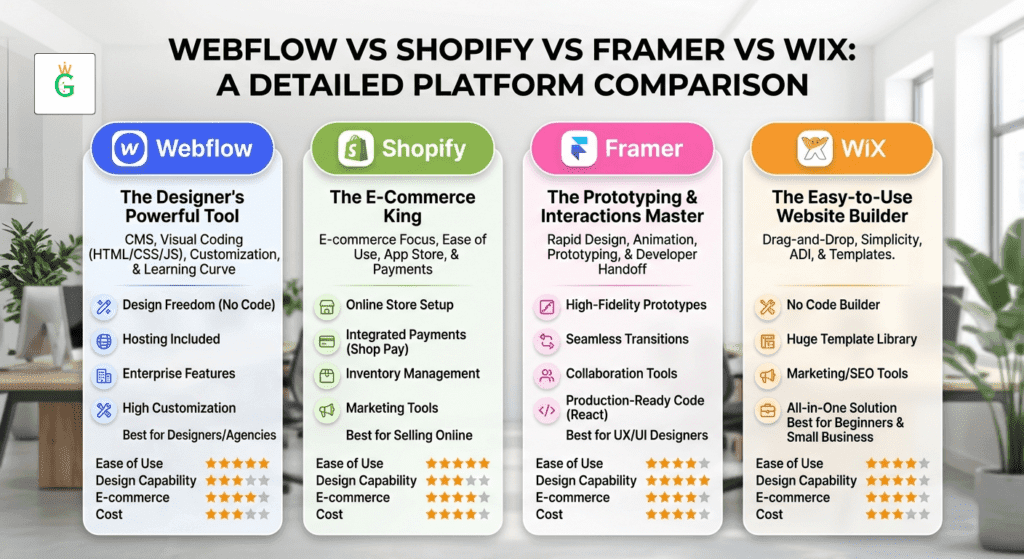
Understanding the value of Webflow pricing requires comparing it against alternatives that serve similar audiences.
| Platform | Starting Paid Plan | CMS Included | eCommerce Transaction Fee | Code Export |
| Webflow | $14/mo | Yes (CMS plan) | 2% (Standard) | Yes (Core+ Workspace) |
| Framer | ~$30/mo | Limited | N/A | No |
| Squarespace | $16/mo | Built-in | 0% (Commerce) | No |
| WordPress + Hosting | ~$10–25/mo | Via plugins | Varies (WooCommerce) | Full |
| Wix | $17/mo | Limited | 0% | No |
| Shopify | $29/mo | Blog only | 0.5–2% | No |
Webflow’s core competitive advantage is design freedom combined with a proper CMS – a combination no other no-code builder matches in 2026. For marketing-focused teams, Webflow’s all-in-one cost (hosting, CDN, security, SEO tools) often compares favorably against an equivalent WordPress setup that layers hosting, premium plugins, and developer maintenance fees over a two-year period.
Which Webflow Plan Should You Choose in 2026?
Selecting the right plan comes down to three variables: your content volume, your traffic expectations, and your team size.
Choose the Basic Plan if you are building a static landing page, a simple brochure site, or a portfolio with no blog and no dynamic content needs. You want clean SEO tools without paying for CMS infrastructure you will not use.
Choose the CMS Plan if you run a blog, content marketing operation, or any site with regularly updated collections. This is the most popular starting point for growing businesses in 2026 and covers most needs up to moderate traffic levels.
Choose the Business Plan if you are hitting CMS item limits (2,000 items) or bandwidth limits (50 GB) on the CMS plan, or if you run a high-traffic marketing site requiring serious content volume. Start at the base $39/month tier and scale modular tiers as your needs grow.
Choose an eCommerce Plan if you sell products directly through your website. Upgrade from Standard to Plus the moment your monthly sales volume crosses $3,700, because the 2% transaction fee on Standard becomes more expensive than the Plus plan price at that point.
Choose a Workspace Plan based on team size. Solo founders often run comfortably on the free Starter Workspace. Small teams of three benefit from Core. Growth-stage teams with unlimited collaborators need the Growth tier. Agencies managing client work need the Agency Workspace for unlimited projects and proper client portal access.
Real-World Cost Examples for 2026
Understanding how these plans combine in practice helps you budget accurately.
Solo Founder – Marketing Site:
- CMS Site Plan (annual): $23/month
- Starter Workspace: Free
- Total: $23/month (~$276/year)
5-Person Marketing Team – Business Site:
- Business Site Plan (annual): $39/month
- Growth Workspace + Seats: ~$49/month base + seat costs
- Analyze Add-on: $9/month
- Estimated Total: $97–130/month depending on seat count
Growing eCommerce Store (Mid-Volume):
- eCommerce Plus Plan (annual): $74/month
- Freelancer Workspace: Free (with paid Site Plan)
- Total: $74/month (~$888/year)
Agency Managing 10 Client Sites:
- 10 × CMS Site Plans: 10 × $23 = $230/month
- Agency Workspace: $35/month
- Total: $265/month (~$3,180/year)
How Growth Wealth Helps You Navigate Webflow Pricing
At Growth Wealth, India’s most affordable and trusted Digital Marketing Services provider, we help businesses make smart technology decisions that maximize ROI without overspending. Our team regularly advises clients on Webflow plan selection, ensuring they start on the right tier for their current needs and scale their plan only when the business data justifies the cost increase. We combine Webflow’s powerful design freedom with performance-driven SEO strategies, conversion optimization, and content marketing to help Indian and global businesses build websites that actually generate leads and revenue. Whether you are a startup evaluating Webflow for the first time or an established brand managing a complex multi-site operation, Growth Wealth provides guidance rooted in real platform experience and measurable outcomes.
Conclusion
Webflow pricing india in 2026 rewards users who understand the system. The dual billing structure, modular Business tiers, usage-based overages, and growing add-on stack can quietly inflate costs for unprepared buyers – but they also offer genuine flexibility for businesses that plan strategically. Start with the CMS plan if you have any content management needs at all. Upgrade to Business only when your traffic or CMS volume demands it. Choose eCommerce Plus as soon as your sales volume makes the transaction-fee math work in your favor. And always choose annual billing.
The platform continues to justify its price through design freedom, a CMS that genuinely works at scale, and an increasingly powerful native tool suite that reduces dependence on third-party subscriptions. In 2026, Webflow is not just a website builder – it is a complete digital experience platform, and its pricing reflects that positioning.
Frequently Asked Questions
Yes – Webflow offers a permanent free Starter plan, but it limits you to a webflow.io subdomain and cannot connect a custom domain.
The Basic Site Plan at $14/month (annual billing) is the most affordable paid option for publishing a live website.
Yes – the Standard eCommerce plan charges a 2% transaction fee per sale; upgrading to Plus or Advanced removes this fee entirely.
Yes – Webflow allows you to upgrade or downgrade your plan at any time, and it prorates the cost difference automatically.
A Site Plan covers hosting and publishing for one live website; a Workspace Plan covers your team’s design environment and collaboration capabilities across all projects.
Absolutely – annual billing saves between 20% and 33% depending on the plan, and that saving compounds significantly for agencies managing multiple sites.